


Download WFDownloader App – Free Batch File Downloader for Windows, Mac, Android & iOS
Overview
WFDownloader App is a free, lightweight download manager that focuses on bulk downloading. Built by the developers at WFDownloader, the utility lets you collect links from a variety of sources—direct URLs, embedded page links, or even automatically scraped lists from a website—and then fetch them in one organized batch. The interface mirrors the simplicity of popular peer‑to‑peer tools like uTorrent, yet it is purpose‑built for HTTP/HTTPS file transfers rather than torrent traffic.
What sets WFDownloader apart is its ability to bypass common redirection mechanisms that many sites employ to slow down download speeds. By connecting straight to the original host, the app often delivers faster, more reliable transfers, especially when you are pulling large numbers of files at once. Whether you are a content creator gathering stock footage, a researcher archiving PDFs, or a casual user who likes to keep a local library of music and videos, WFDownloader offers a central hub where you can set custom save folders, define naming patterns, and schedule simultaneous or sequential downloads.
Although newcomers may need a short adjustment period to master batch creation and advanced settings, the learning curve is shallow and the payoff is a highly efficient workflow that eliminates the need for repetitive manual downloads.
Key Features
- Batch download support – add dozens of URLs at once and manage them in a single queue.
- Direct source fetching – skips redirection layers for faster, more stable transfers.
- Universal format compatibility – handles images, videos, archives, documents, executables, and more.
- Customizable save directories – create separate folders for different projects or file types.
- Pattern‑based naming – use placeholders for date, original filename, or custom tags.
- Proxy and VPN integration – configure proxy servers for privacy‑focused downloading.
- Simultaneous or sequential download mode – choose between maximum speed or bandwidth conservation.
- Link scraper – extract all downloadable links from a given webpage with one click.
- Cross‑platform UI – consistent look and feel on Windows, macOS, Android, and iOS.
- Free forever – no hidden fees, premium tiers, or trial periods.
The feature set is deliberately kept uncluttered, allowing power users to dive deep into automation while casual users can simply paste a link and hit “Download”. Each option is exposed through an intuitive left‑hand navigation pane, making it easy to switch between active batches, completed files, and settings. Because the app is free, updates are delivered regularly via an automatic updater, ensuring you always have the latest security patches and performance improvements.
Installation & Usage Guide
Step‑by‑Step Installation
1. Visit the official WFDownloader website and click the “Download” button that matches your operating system (Windows 10/11, macOS 10.13+, Android 6+, or iOS 13+).
2. The installer is a small .exe, .dmg, .apk, or .ipa file depending on the platform.
Run the file and follow the on‑screen prompts. The process typically takes less than a minute because the package contains only essential libraries.
3. After installation, launch WFDownloader from your desktop shortcut, Applications folder, or mobile home screen.
The first launch will ask you to grant storage permissions, which are required for saving downloaded files.
Creating Your First Batch
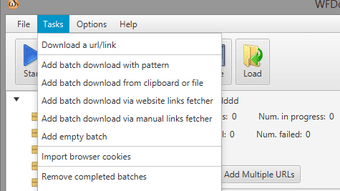
When the main window appears, you’ll see three tabs: Batch List, Completed, and Settings. To start a new batch, click the “New Batch” button in the left navigation pane. A blank grid opens where you can paste multiple URLs—one per line—or import a text file containing links.
For each entry you can assign a custom filename pattern or let the app keep the original name. Once your list is ready, select the desired download mode (simultaneous or sequential) and click “Start”. The progress bar updates in real time, and you can pause, resume, or cancel any item individually.
Advanced Options
Under the Settings tab you’ll find proxy configuration, bandwidth throttling, and default save‑folder paths. Mobile users can enable “Wi‑Fi only” mode to avoid cellular data charges. If you frequently download from a particular website, use the “Link Scraper” tool: enter the site’s URL, and WFDownloader will automatically collect every downloadable link it detects, adding them to a new batch with a single tap.
Compatibility & System Requirements
WFDownloader is built on a cross‑platform framework, so it runs natively on Windows 10/11 (64‑bit), macOS 10.13 or later, Android 6.0+ (ARM and x86), and iOS 13+. The minimum hardware specifications are modest: a 1 GHz processor, 512 MB RAM, and at least 100 MB of free disk space for the application itself. Because the app streams data directly from source servers, it does not require any additional codecs or runtime libraries. It also integrates smoothly with popular browsers (Chrome, Edge, Safari, Firefox) through a simple “Copy Link” extension that places the URL into the clipboard, ready for pasting into WFDownloader. For users who rely on VPNs or corporate proxy servers, the built‑in proxy manager supports HTTP, SOCKS5, and authenticated connections, ensuring compatibility with most network environments.
On mobile devices, WFDownloader respects the operating system’s background‑task limits, so downloads continue even when the app is minimized, provided you have granted the necessary “Background App Refresh” permissions. Battery consumption is low because the engine only activates during active transfers and sleeps otherwise. Overall, the app’s lightweight design makes it suitable for both high‑end workstations and modest laptops or tablets.
Pros and Cons
- Pros:
- Completely free with no hidden charges.
- Robust batch processing saves time on repetitive downloads.
- Direct source fetching improves speed and reliability.
- Highly customizable naming and folder structures.
- Cross‑platform support ensures a consistent experience.
- Built‑in link scraper reduces manual copy‑pasting.
- Cons:
- Initial learning curve for users unfamiliar with batch managers.
- No built‑in torrent support (focuses solely on HTTP/HTTPS).
- Advanced proxy settings may be confusing for beginners.
Overall rating: 4.5/5. WFDownloader shines as a free, feature‑rich batch downloader that balances simplicity with power‑user capabilities. While the UI may require a brief familiarization period, the performance gains and time savings make it a worthwhile addition to any file‑intensive workflow.
Frequently Asked Questions
Is WFDownloader truly free or are there hidden fees?
Yes, WFDownloader is completely free. There are no premium tiers, in‑app purchases, or subscription models. All features are available to every user.
Can I pause and resume downloads?
Absolutely. Each file in a batch can be paused, resumed, or cancelled individually, and the app remembers incomplete downloads after a restart.
Does WFDownloader support downloading from password‑protected sites?
Yes. When adding a link, you can provide authentication credentials (username and password) in the advanced settings of that entry.
Is there a limit to the number of simultaneous downloads?
The default maximum is 8 concurrent downloads, but you can adjust this number in the Settings panel to match your bandwidth and system capacity.
How does WFDownloader handle corrupted files?
If a file fails the integrity check, the app automatically retries the download up to three times and then flags the item for manual review.
Conclusion & Call to Action
WFDownloader App delivers a compelling mix of speed, flexibility, and zero cost, making it an excellent choice for anyone who regularly handles large volumes of files. Its batch‑processing engine, direct source fetching, and extensive customization options empower both novices and power users to streamline their download workflow without sacrificing control. While the interface may feel a little dense at first, the built‑in tutorials and straightforward navigation quickly bring you up to speed. If you’re looking for a reliable, free alternative to commercial download managers, WFDownloader is ready to download, organize, and protect your data efficiently across Windows, macOS, Android, and iOS. Download WFDownloader today and experience the convenience of bulk downloading done right.







